Ask a Question
The Ask a Question action simplifies one of the most common bot configurations: asking the user for input, handling follow-ups when they don't reply, and (optionally) managing invalid answers.
How to use it
The action is divided into two sections: message setup and fallback setup.
Step 1: Message setup
1. Write the message
Write the question or message you want to send to the user.
2. Add buttons or a list (optional)
You can optionally add interactive buttons or a list of options for the user to choose from.
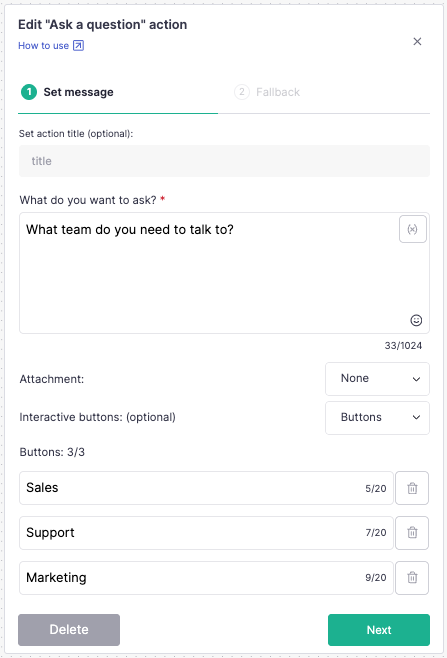
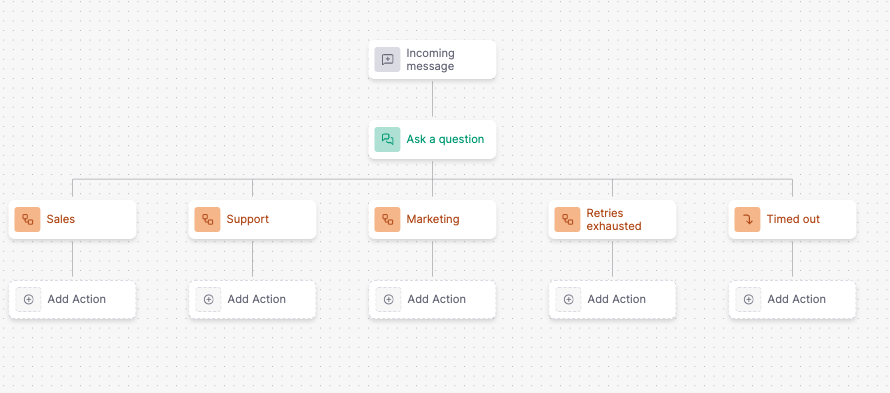
With buttons or a list, each option you add automatically creates its own output in the flow, so you can define a different continuation for each choice.
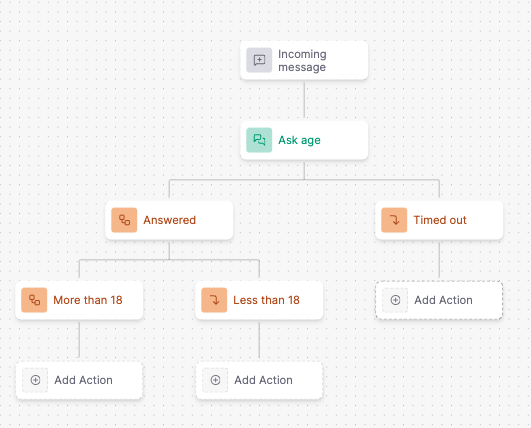
Without buttons or a list, any reply is accepted. The flow continues from a single "Answered" output. If you need different continuations based on what the user replied, add them as custom outputs below "Answered."
Step 2: Fallback setup
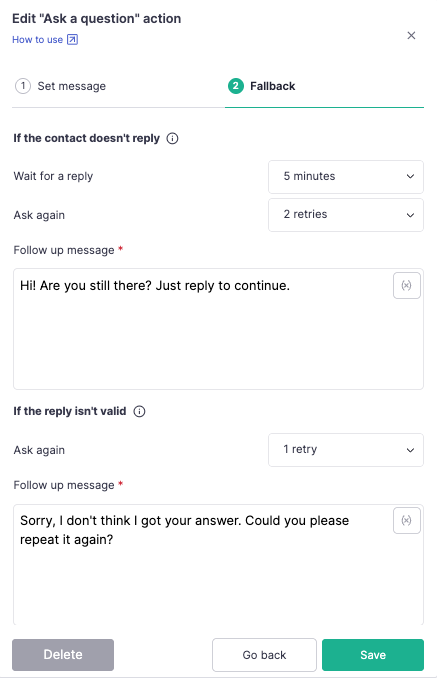
1. Maximum wait time
Set how long the action should wait for a reply before triggering a follow-up. You can use from 5 minutes up to 23 hours.
2. Number of follow-up messages
Choose how many automatic follow-up reminders to send if the user doesn't reply. Set to 0 to disable follow-ups, or up to a maximum of 5.
3. Follow-up message
Write the reminder message sent after the wait time has passed.
4. Number of errors allowed
Set how many invalid replies the user can give before the flow moves to the error path. This option only appears when buttons or a list are configured, since a reply only counts as invalid when it doesn't match one of the options. If no buttons or list are set, any reply is valid and this option is hidden.
5. Error message
Write the message sent when the user's reply doesn't match one of the configured options. Required if you set 1 or more errors allowed.
How nodes are created automatically
| Configuration | ✅ Success node(s) | ❌ Error node | ⌛️ Scheduled Fallback node |
|---|---|---|---|
| No buttons/list (free reply) | One "Answered" output (add custom outputs below it if needed) | Not created | Configured automatically |
| Buttons | One node per button | When the reply isn't one of the buttons | Configured automatically |
| List | One node per option | When the reply isn't one of the options | Configured automatically |
For buttons and lists, each option automatically creates its own exit path in the flow, so you can define different continuations for each choice without any extra setup.